a better shell
Hello everyone!
So, i’ve been using Nushell as my daily driver for three months now. my previous shell was Fish, which i liked because it works well out of the box and is fast. Completions worked great and there’s almost no setup. Nushell’s different. I started using it just for programming/dev stuff, but then switched completely. its not without quirks, the initial setup takes more effort than Fish, some defaults feel like they should be built-in, Fish completions are more snappier.
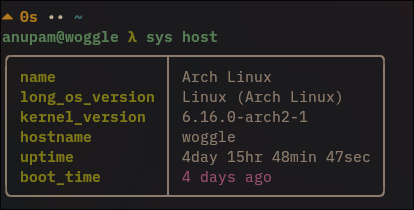
So, why switch? Because of how it handles data. If your work touches structured stuff (json, csv, command output that you usually massage with awk/grep), Nushell is in a different league. it treats data like a proper language, not a blob of text. Also, its supported on Linux, Mac and Windows as well.
it’s a trade-off. u sacrifice a little bit of that raw, instant speed for a big win in clarity and power for data-y tasks. not for everyone, but absolutely worth a spin to see if it fits your flow.
text -> structure
traditional shells spit text. you end up parsing columns that shift if the moon is in retrograde. nushell returns typed data (tables, lists, records).
bash/fish:
ls -l | sort -k5 -nr | head -n 5
i can't seem to remember these commands
nu:
ls | where type == file | sort-by size | reverse | first 5
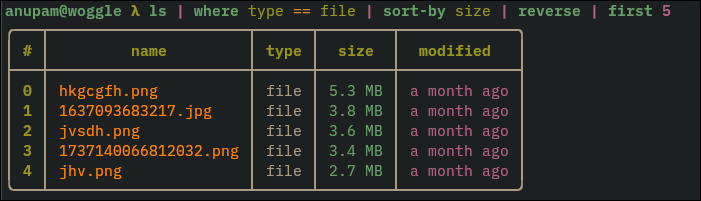
its more verbose but readable and stable. columns have names (name, type, size), sizes are actual sizes, dates are dates. you stop doing text surgery and start querying data.
the pipeline
in nushell, the pipe doesn't just send text forward, it’s send a table/list/record forward.
top 5 largest files (current dir):
ls | where type == file | sort-by size | reverse | first 5
processes (>10% cpu):
ps | where cpu > 10 | sort-by cpu | reverse | select pid name cpu mem

usage examples
curl,
http get "https://api.github.com/repos/nushell/nushell" | get stargazers_count
http get "https://api.github.com/repos/nushell/nushell" | get owner.login
yes, nushell has built-in http client
or, maybe let
let nu_git_data = http get "https://api.github.com/repos/nushell/nushell"
$nu_git_data | get stargazers_count
csv/calc in the shell
open data.csv | where status == "active" | group-by team | wrap rows | each { |it|
  { team: $it.column0, count: ($it.rows | length) }
} | sort-by count | reverse
sqlite
open foo.db | query db "SELECT * FROM Bar"
the trio: where, get, select
wherefilters rows:history | where command =~ "git"getgrabs fields:ls | get nameselectkeeps columns:ls | select name size modified
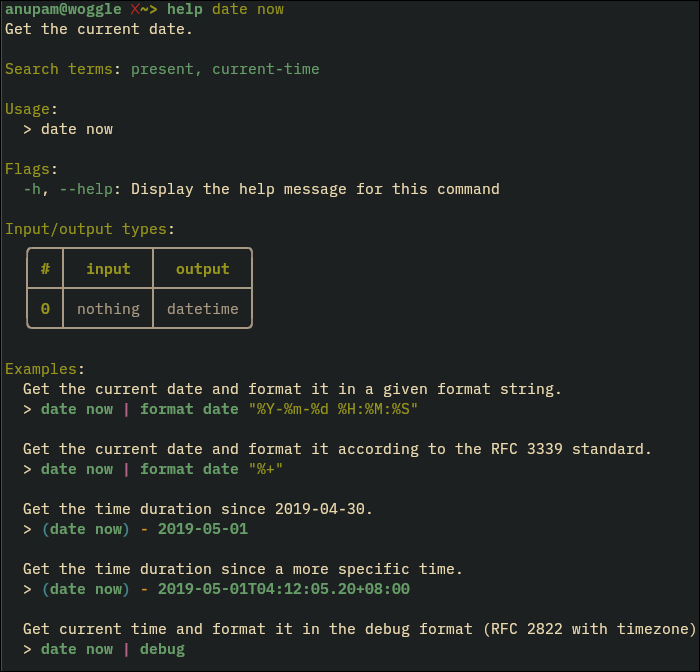
discoverability
help commands | where name =~ "split"
help str
help date now
log slicing
open app.log
| lines
| where $it =~ "ERROR"
| first 50
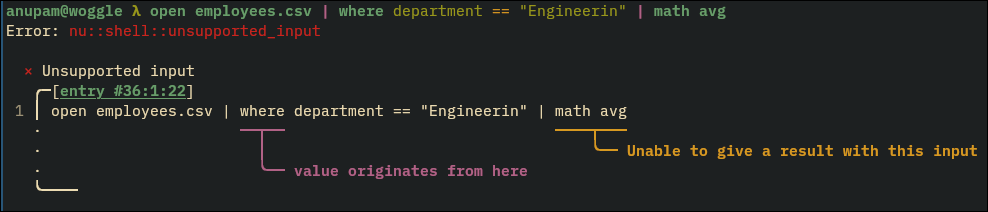
errors
the config (config.nu)
Here, i am using sqlite for shell history, carapace as external completions provider, and starship for prompt. this was my starter config.
$env.config = {
    show_banner: false

    history :{
        file_format: "sqlite"
        max_size: 1_000_000
        sync_on_enter: true
        isolation: false
    }

    completions: {
        case_sensitive: false
        quick: true
        partial: true
        algorithm: "fuzzy"
        sort: "smart"
        use_ls_colors: true
    }

    cursor_shape: {
        emacs: "line"
        vi_insert: "line"
        vi_normal: "block"
    }
}

# completions ----------------
$env.CARAPACE_BRIDGES = 'inshellisense,fish,zsh,bash'
mkdir ~/.cache/carapace
carapace _carapace nushell | save --force ~/.cache/carapace/init.nu
source ~/.config/carapace/init.nu

# alias ----------------------
alias ll = ls -l
alias la = ls -a
alias lla = ls -la
alias sl = ^ls
alias mk = mkdir
alias cat = open --raw
alias nv = nvim

# for python venv ------------
# here some functions are defined that can be called from the shell
# venv_activate .venv - for activate python virtual environment (.venv by default)
# venv_deactivate - deactivating py venv

export def --env venv_activate [a_venv_path: path = "./.venv"] {
    let venv_path = $a_venv_path | path expand
    let bin_path = $venv_path | path join "bin"
    let python_path = $bin_path | path join "python"
    let python3_path = $bin_path | path join "python3"

    if not (($python_path | path exists) or ($python3_path | path exists)) {
        print $"Error: is not python venv path! ($a_venv_path)"
        return false
    }
    if ("_OLD_VIRTUAL_PATH" in $env) {
        $env.PATH = $env._OLD_VIRTUAL_PATH
        hide-env _OLD_VIRTUAL_PATH
    }

    $env.VIRTUAL_ENV = $venv_path
    $env.PATH = $env.PATH | prepend $bin_path
    $env._OLD_PROMPT_COMMAND_RIGHT = $env.PROMPT_COMMAND_RIGHT

    return true
}

export def --env venv_deactivate [] {
    if "VIRTUAL_ENV" in $env {
        let venv_bin = $env.VIRTUAL_ENV | path join "bin"
        hide-env VIRTUAL_ENV
        $env.PATH = ($env.PATH | where {|x| $x != $venv_bin})
        return true
    }

    return false
}

# prompt ---------------------
$env.STARSHIP_LOG = "error"
mkdir ($nu.data-dir | path join "vendor/autoload")
starship init nu | save -f ($nu.data-dir | path join "vendor/autoload/starship.nu")
trade-offs
- compat: you can’t copy-paste bash scripts and expect them to run in nu. use the escape hatch:
%%CODE0%% - completions: good for nu-native. carapace helps.
trading POSIX universality for structured power and readability. if your work is data-heavy or you script a lot, it’s worth it.
nu vs fish
I'd rather put them in separate buckets. Fish is great for quick, interactive use with minimal setup, and its POSIX-like syntax feels familiar. Nushell, written in Rust, trades some of that instant familiarity for structured data pipelines that shine in data-heavy tasks. I still keep Fish installed and use it sometimes. Nushell has active development and a growing community. its ecosystem is smaller than Fish or Zsh, but its growing. It also supports plugins, though I haven't tried them yet.
try it for a week. keep fish/bash around. if you spend time transforming output, nu will probably stick.